
You've built an AI workflow that generates great content. Now you need it in a PDF. Good luck.
If you’re reading this after searching for quick solutions and wondering how it can be that such a fundamental task is not already completely solved - you are not alone! It’s surprisingly difficult, especially if you want an automated and robust solution.
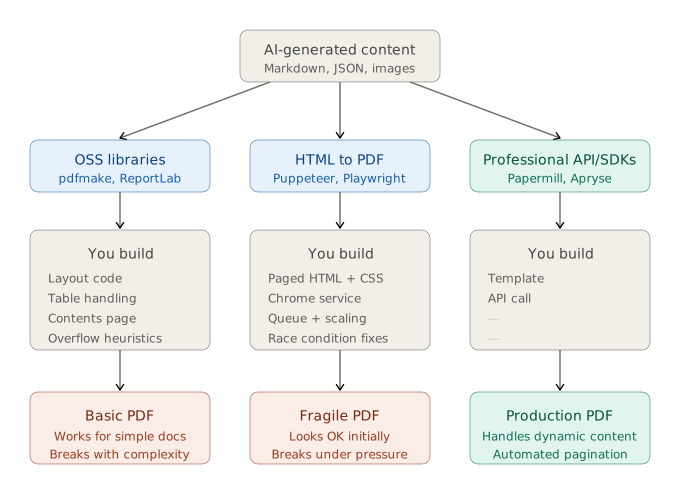
Here’s a quick breakdown of your options for PDF generation - I’ll go into more detail below:
Generate a PDF programmatically using an open source library. Write a program to lay out the PDF, essentially hardcoding a design and its content in code and data structures. Handle AI output on a case-by-case basis in your own code (for example, manually adjusting table cell sizing or writing heuristics to avoid overflow).
Generate HTML, then convert that HTML to a PDF. This is the most common route followed by companies before they adopt Papermill. You can generate HTML directly from AI models, or programmatically generate HTML from AI markdown, images, etc. You’ll want to perform the conversion to PDF by running Puppeteer or a similar solution that enables you to automatically “print” a web page via the Chrome browser in headless mode.
Use a professional service. Rather than rolling your own document system, buy in a solution. This could mean subscribing to a SaaS service that mail-merges docx files, licensing an enterprise PDF SDK as a replacement for an OSS library, or using a complete document generation system like Papermill. You’ll need a way to inject AI content into the document, or else write conversion code at the top of the process.
Generating PDFs using Open Source Libraries
Using open-source libraries means writing code to generate the PDF explicitly, usually page-by-page and placing images, tables, and other content directly onto the page. This low-level approach makes for a lot of work, and OSS libraries have only limited support for page breaking, automatic sizing, and important document features like contents pages and references.
There are a few decent open source libraries out there for each language, and it’s a good place to start when getting to grips with document generation.
For TypeScript/JavaScript we’d recommend trying pdfmake first - its declarative style is easy to work with and debug, although it is somewhat limited in the features it provides and, like most open-source libraries, it breaks when building more complex documents.
Notable mentions for the TypeScript/JavaScript ecosystem include pdfkit for lower-level PDF generation, and pdflib for splicing and dicing documents. The jsPDF library is a widely used alternative to pdfkit. If you’re using React and don’t mind (or want!) your PDF to contain content that mirrors the appearance of web components, you should definitely check out react-pdf.
Python programmers have a few choices. WeasyPrint is a halfway house: it takes HTML as input, but maps that directly to a PDF rather than using Chrome as a rendering engine. This gives you a bit more styling than a typical OSS library, but it tends to struggle with more complex layouts and CSS. Another library that takes a similar approach is xhtml2pdf - less sophisticated than WeasyPrint, but simpler and more robust.
ReportLab is a common choice for more technical documents, and gives you full control of layout. It’s low-level and doesn’t have the modern features you might expect, such as reusable components. The library is more of a gateway to a commercial service with quite a high entry price - whilst still lacking many of the features you might expect. If you’re doing fairly straightforward technical reports, the open-source version of ReportLab can work well for you.
In many ways pdfkit, the JavaScript library, is similar to ReportLab: you have full control over layout through a low-level library, but complex results require quite a lot of work. That’s one reason pdfmake builds on pdfkit - exposing a higher-level abstraction that makes pdfkit easier to work with.
One final shoutout: we do respect the LaTeX system and its modern equivalent Typst. Both excel at generating scientific reports. They’re certainly not for the faint-hearted and aren’t going to be taking the design world by storm any time soon, but if your reports look like scientific papers they’re the perfect fit.
Converting HTML to PDF
You want to create PDFs, but it’s difficult. You decide to first generate HTML. Now you have two problems.
Using HTML doesn’t really “solve” the problem, but rather just moves it: you now need to create high quality paged HTML output, knowing you can convert it to PDF later. Much like ReportLab or pdfkit, you’re again using low-level primitives to build a complex document. The advantage that HTML does have is developer familiarity: most devs know HTML, although getting deep into the relevant CSS is another matter.
To convert HTML to PDF, you’re going to need to run the Chrome engine and hit “save” to produce the PDF. Most solutions use Puppeteer, but we’d recommend trying its close cousin Playwright instead. Playwright is a more modern library and reduces the number of race conditions you’ll have to contend with. We’ve used both tools for browser automation at Papermill and Playwright does seem a much better-engineered solution, albeit with a smaller user base.
You’ll need to deploy this setup as a service, which means either a docker image running on CloudRun or similar, or else as a Lambda Function. In the latter case especially, you’ll need to consider scaling and cold starts. It’s a pain, to be honest - prepare for memory leaks, and catering for parallel requests quickly eats a lot of RAM. You might also need a queuing system, and consider providing some infrastructure to asynchronously return documents. Then there’s various optimisations - caching frequently used content, etc…
It’s worth mentioning the managed services that run Puppeteer for you - there are dozens of such services, although they do little more than running Puppeteer and pressing print, but it does save you a deployment headache. We haven’t tested them, so we won’t recommend a particular service - it’s a commoditised product and likely to suffer the same race-condition and other rendering problems with self-hosted solutions. For many companies, fragile systems using Puppeteer rendering are a major reason to move to a professional managed service like Papermill.
The other significant problem with HTML-PDF is that HTML is very limited when used as a print language. As a simple example: there’s no “contents page” tag in HTML, so you’ll need to write code to generate one. We’ve tried internally at Papermill to build reliable HTML contents page generators using coding agents, but it’s fundamentally the wrong tool for the task at hand and any solution feels fragile and eventually breaks when pushed.
There are also many features HTML doesn’t support that Papermill can, but we’d recommend at the least adding paged.js into your stack. It adds support for some of the basics, like headers, footers and cross-references. We’ve tested it and it’s a significant improvement over plain HTML.
Fundamentally, though, HTML doesn’t really know what a page is - it wasn’t designed for print, and pages and content (stories, flows) don’t exist in the same way they do in Papermill. Most of our customers have been down this route, and it’s painful to remove a Puppeteer legacy system once you’re sunk that cost.
Professional PDF Services
Professional services can be divided between PDF SDKs, which are essentially more sophisticated (and expensive!) versions of the open source libraries, and remote API services. We’ll skip the Puppeteer services mentioned previously, as they don’t offer help with template setup.
Papermill takes a different approach to most services: it offers its own document language, Press, which can be used to design layouts and write content. Templates are written in Press, avoiding the low-level code of SDK-based solutions, and the typesetter automatically copes with dynamic content through automated pagination and flowing content across frames. It’s a full document generation system with a dedicated template authoring and testing platform.
One major PDF SDK is Apryse. This is more of an enterprise solution for general PDF manipulation, but it has a comprehensive enterprise solution if you’re building document-heavy products that involve form-filling, PDF data extraction etc.
If your document needs are relatively simple, then you might be able to get away with one of the basic APIs that supports a limited range of templates. You send JSON and get a PDF. We’d like to give a shoutout to Hybiscus - we really like their branding and the designs of their built-in templates. These services are affordable and they’ll get you up and running fast, but they’ll break down with complex or dynamic content - a common problem when working with generated content within AI workflows. They tend to hit problems with paginated content, and unexpectedly long strings break tables and containers.
A final niche product we like is Docugenerate - this is a really quick and simple “mail merge” approach to generating Word documents (not PDFs). It’s easy to use and the results are fine for simple Word documents.
Which should I use?
If you just need a plain text document, maybe with a few images or tables, we’d recommend you go with an OSS pdf library such as pdfmake. This is a great place to start for prototyping too - you can always put placeholders for complex features, and use a simple layout until you’re ready to make it look good. You could also consider the Papermill starter tier, which will get you going even faster if you start with an example template and gradually tweak it.
What about HTML approaches? Honestly, we’d recommend you don’t use them. The truth is: HTML isn’t a print language, and it just isn’t designed for professional layout. Yes, you can sometimes get something working for a while, but in our experience it will break when stretched. It’s better to skip the pain and time-sink of trying to make HTML work for print, and use a professional document generation solution instead.
If you need production-grade documents with dynamic content - especially AI-generated content - a professional service will save you months of engineering time. If you’re already using a HTML-PDF solution, the good news is that Papermill’s Press language is designed to be instantly familiar to web developers in order to ease the transition to a professional service - you can trial Papermill free at papermill.io
Like this article? Share it.


